manual · chapter: host discovery
Angry IP Scanner, first run to finished CSV
Six steps, roughly one minute of scanning, one table you can save and reuse. Everything below was done on an ordinary home LAN.
revised 15 september 2026 · version 3.9.x · free & open source
§ 1The idea in one paragraph
You hand it an address range. It asks each address a handful of questions — ping, hostname, MAC, chosen ports — and stacks the answers into a table, one row per address. No agent on the targets, no database on your side, nothing left running when you close the window. It is a torch, not a security system, and that is exactly why it works so well.
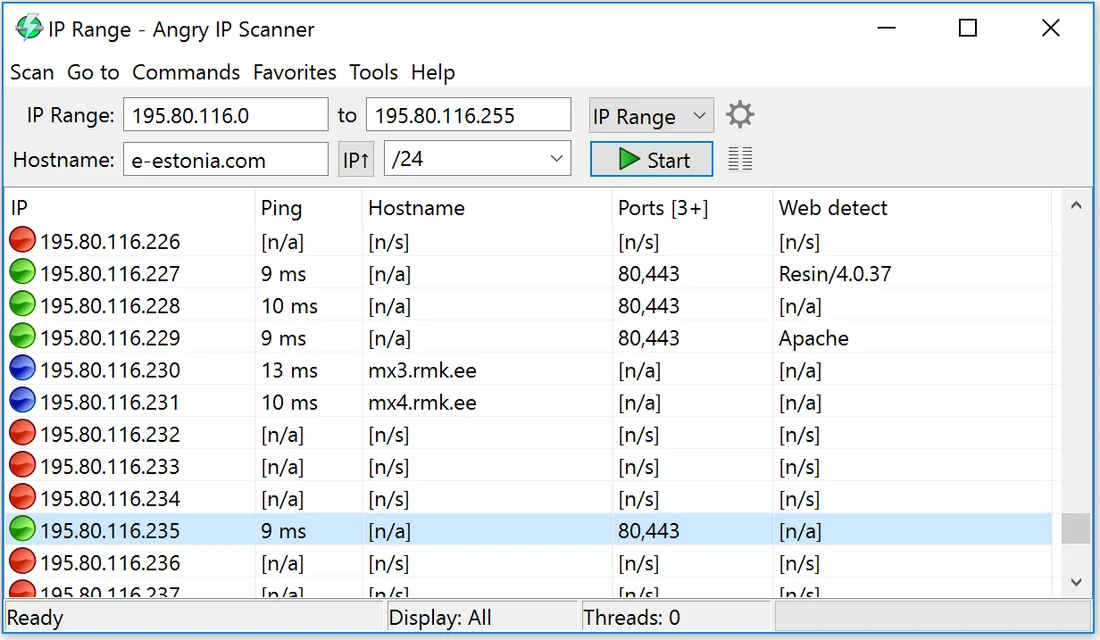
§ 2The procedure
-
Confirm the range
Press the IP button — it copies your machine's address and subnet into the range field. For a home network that resolves to a tidy 254-address block. Resist the urge to scan wider: big ranges mostly buy you hours of waiting.
-
Choose your fetchers
Tools → Fetchers. Add MAC Address, MAC Vendor and Ports to the defaults if you want them as columns. Every extra fetcher costs sweep time, so keep the list honest about what you will actually read.
-
Run the sweep
Start it and watch the counter. When it halts, two numbers matter: hosts that replied, and open ports found. Those are your results; the rest of the chrome is comfort.
-
Decode the table
Populated row means a live host.
[n/a]means asked and nothing came back;[n/s]means the host never replied to ping, so no fetcher was tried. A device showing[n/s]that you expected to be chatty is usually a phone in power-saving mode — or a firewall. -
Export the evidence
Scan → Export all produces CSV, TXT, XML or an IP:port list. Drop each export in a dated folder; a year of these files is a surprisingly effective change log of your network.
-
Repeat on schedule
One sweep answers "who is here now". Monthly sweeps answer the better question — "what changed since last month". The census routine formalises it.
§ 3Platform specifics
Windows — the installer includes its own Java runtime; there is
nothing to prepare. macOS — the disk image is unsigned, so bypass
Gatekeeper with a right-click → Open the first time.
Linux — use your distribution's package where available, or run
the raw .jar on Java 11 or newer.
§ 4Reader questions
Is Angry IP Scanner safe to download?
The project itself is clean and open source, but antivirus heuristics occasionally object to any fast address sweep. Download exclusively from angryip.org or the GitHub releases page and check the published checksum rather than trusting third-party mirrors.
Why is the MAC column empty for some devices?
MACs live on the local subnet only; the scanner reads them from your ARP table. Anything behind a router shows blank. Scan from inside that other subnet if the MAC matters.
How fast is a full home scan?
A /24 finishes in seconds to a minute on any computer from the last decade. The main slowdown is over-eager fetcher selection, not the sweep itself.